Since 2008
Based in Belgium and France
+ 60 000 clients
Our blog
A.S.S.
Shopping Cart
Discover how to configure Deye Copilot step by step to maximise your energy savings. Comprehensive guide with...
Augmentez votre taux d'autoconsommation de 20 à 40% sans investir dans de nouveaux panneaux. Découvrez 12 actions...
Batterie physique ou virtuelle pour votre installation photovoltaïque ? Découvrez notre comparatif complet 2026 avec...
Comprehensive technical guide to Deye hybrid inverter configuration: energy bus architecture, critical BMS...
Mise à la terre photovoltaïque conforme RGIE (Belgique) et NF C 15-100 (France) : résistance ≤30Ω, sections câbles...
Imagine a solar installation that manages itself, knows exactly when to charge your batteries at the cheapest time, when to use energy from the grid or from your panels, and makes all these decisions automatically while you sleep. That's exactly what Deye Copilot EMS does.
If you have a Deye hybrid inverter with storage batteries, you already have the perfect equipment. Now, with Deye Copilot, you can make your installation truly smart. No more wondering whether to charge your batteries at night or save them for tomorrow: artificial intelligence decides for you.
💡 Already have a Deye inverter? Check out our technical setup guide
Learn how to configure your inverter before activating Copilot
"Deye Copilot EMS is like having an energy expert working for you 24 hours a day, analysing electricity prices in real time and automatically controlling your installation so that you never pay too much for your electricity."
EMS stands for "Energy Management System". But forget the technical jargon: Deye Copilot EMS is simply the intelligent brain that automatically controls your solar installation.
Here's what it does for you, without you having to think about it:
You've invested thousands of pounds in solar panels, a Deye hybrid inverter and storage batteries. But without Copilot EMS, your installation is only operating at 60% of its potential.
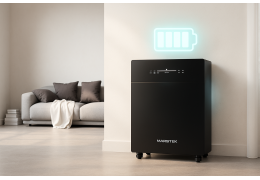
Deye-compatible lithium batteries - Pylontech, Marstek, BTS
Before configuring Deye Copilot EMS, make sure you have:
✅ If you tick all these boxes, you're ready to go! Let's move on to the step-by-step configuration.
📚 Need help connecting your Deye inverter to the app? Complete Solarman/Deye Cloud app guide
Wi-Fi configuration, RS485 connection and advanced monitoring
Before requesting Copilot EMS activation, a quick check is required. Your installation must be correctly configured in the Deye Cloud application.
🎯 If you see real-time data, you can proceed to the next step. Otherwise, check your Wi-Fi connection or consult our troubleshooting guide.
This is THE crucial configuration. Without this information, Deye Copilot EMS cannot make intelligent decisions. It absolutely needs to know how much electricity costs at each hour to know when it is profitable to:
There are two ways to access them in the application:
Method 1 (the simplest): On the home page of your installation, tap directly on the area where the import/export price gauges are displayed.
Method 2: Go to Advanced Settings > Tariff Type
You have two options depending on your electricity contract:
This is the most common option in France and Belgium. Choose this option if:
22:00
06:00
£0.18/kWh
€0.10/kWh
0
£0.25/kWh
💡 Pro tip: Be ultra-precise! Take your electricity bill and note down the prices to the nearest cent. Every cent counts for the AI calculations. The more accurate the information, the more you save.
This option is for pioneers! Choose it if you have a contract with a supplier whose prices change hourly according to the market (such as Tibber, certain Engie Pro contracts, etc.).
✅ Once the link is established, Deye Copilot automatically retrieves prices in real time. You don't need to do anything else!
Also configure the feed-in tariff (if you sell your surplus): Choose between "Fixed subsidy" (constant price) or "Dynamic tariff" (variable price).
Once your rates are configured, press "Next" or "Confirm".
🎉 Congratulations! You have just given Deye Copilot EMS the ability to see the electricity market. It is now ready to be activated.
Now that your tariffs are perfectly configured, it's time to wake up the artificial intelligence! Deye Copilot EMS is activated via a request made directly in the application.
Once your request has been submitted, the Deye team must review it manually. It's not instantaneous, but it's worth the wait!
Once approval has been received (you will see the message "Deye Copilot is Enabled!"), there is one last step to give control to the AI:
🎊 That's it! Deye Copilot EMS is now the official pilot of your energy system. It will start analysing your data and applying its optimisation strategy.
⏳ Important note: The AI needs a few days to learn your consumption habits. Do not be surprised if the decisions seem cautious during the first few days. After 5-7 days, Copilot will be fully operational and optimised for your situation.
✅ Battery profitability calculator • ✅ Customised sizing • ✅ Savings simulation
Your Deye Copilot EMS is now active and already using a highly effective default strategy. But you can go even further! The advanced settings allow you to fine-tune the AI's behaviour to your specific needs.
To access them: Home page > "Advanced Settings"
This is the strategic brain of Copilot EMS. You give it its main mission. Three options:
🎯 Our advice: Start with "Maximise self-consumption". This is the safest and most profitable strategy in 99% of cases for residential installations.
Your batteries are an investment of several thousand pounds. This menu allows the AI to take into account the "wear and tear cost" and preserve their lifespan.
"The cost of my battery cycles..." control: Enable this option! The AI will be gentler on your battery and avoid charging/discharging it for minimal gains.
Battery cost: Enter the total price you paid for your batteries (e.g. £5,000).
£5,000
Battery cycle: Number of cycles guaranteed by the manufacturer (usually 6,000 cycles for Pylontech, Marstek, etc.)
Battery Capacity: Total capacity in kWh (e.g. 22 kWh)
22 kWh
💡 Why is this important? With this information, Copilot EMS calculates that a full cycle costs approximately £0.83 (£5,000 ÷ 6,000 cycles). It will only charge/discharge the battery if the savings exceed this cost. The result: your battery lasts 15-20 years instead of 8-10 years!
🔋 Need advice on choosing your batteries? 48V or High Voltage Battery: The Complete Guide
Comparison, advantages, sizing and profitability
This setting is useful if your electricity contract charges penalties for consumption "peaks" (exceeding the contracted power).
Control Mode: Only activate this if applicablePeak Smoothing SoC: Battery level (in %) kept in reserve to manage a peak
🎯 Our advice: For most domestic contracts in France and Belgium, this is not necessary. Leave it set to "Not activated" unless you are charged penalties for exceeding your power limit.
This menu is intended for those who have a surplus resale contract (such as EDF OA or Belgian prosumer contracts).
"I have a licence..." checkbox: Enable if you have an official contract
Authorised Injection Time Slots: Set the specific hours during which sales are authorised
Threshold (Very Important!): Tell the AI: "Do not inject if the sale price is less than X €/kWh". Example: 0.08 €/kWh
0.08 €/kWh
Maximum Injection Power: Limit imposed by the network operator (e.g. 5 kW)
5 kW
💰 Our advice: If you sell, activate the control and set a minimum threshold. This prevents you from selling your precious solar energy for a few pence.
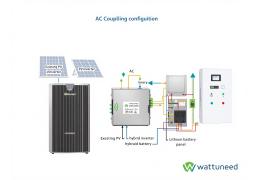
This parameter concerns specific configurations with several inverters (AC grid coupling, AC load coupling, AC generator coupling).
🎯 Our advice: If you have a conventional installation with a single Deye hybrid inverter, do not activate this option. Leave it disabled by default.
The configuration is complete, and the AI is working around the clock. But how do you know if it's really effective? The Deye Copilot dashboard shows you exactly what's happening and how much you're saving.
Open the Deye Cloud application and select your installation. You will be taken to the main dashboard.
Import Gauge (left): Current price at which you are purchasing electricity, with the day's minimum/maximum prices
Feed-in Gauge (right): Price at which you sell your surplus
These gauges allow you to see at a glance whether electricity is expensive or cheap at the moment.
The graph superimposes several curves that tell the story of your energy day:
By looking at these curves, you can "spy" on the AI's intelligent decisions:
🎯 That's the magic of Copilot EMS: it doesn't just react, it anticipates!
At the bottom of the graph, you will find the key indicators:
You can navigate between "Live", "Day", "Month" and "Year" to get an overview of the profitability of your installation since Copilot EMS took control.
📈 Real testimonial: "Before Deye Copilot, I was paying £150/month for electricity. Since activating it, I'm down to £45/month. The investment in batteries is paid off in 4 years instead of 8!" – 10kW installation + 15kWh batteries
Ready-to-install packs with Deye hybrid inverter + Copilot EMS-compatible lithium batteries
Yes! Copilot EMS is compatible with all batteries connected to a Deye hybrid inverter: Pylontech, Marstek, BTS, Huawei, Dyness, etc. The AI communicates with the inverter, not directly with the batteries.
Yes, Deye Copilot EMS is included free of charge with all Deye hybrid inverters. No monthly subscription, no hidden costs. Simply request activation in the app.
The AI starts working immediately after activation, but it reaches its maximum efficiency after 5 to 7 days. This is the time it needs to learn your consumption habits, analyse weather patterns and refine its predictions.
You can change your tariffs at any time in the app (Advanced Settings > Tariff Type). Changes are immediately taken into account by Copilot EMS, which adapts its strategy accordingly.
Absolutely! You can switch between "Manual Mode" and "Deye Copilot" at any time from the home page (Control Mode section). This is useful for testing or making one-off adjustments.
No, Copilot EMS requires a permanent internet connection to retrieve weather forecasts, dynamic tariffs and communicate with Deye servers. If the connection is lost, the inverter automatically switches to manual mode with the last saved settings.
🎉 Congratulations! Not only have you configured Deye Copilot EMS, but you have also transformed your solar installation into a 100% smart and autonomous system. You have regained complete control over your energy consumption and production.
By following this guide, you have:
💡 Remember: Deye Copilot EMS's AI is constantly learning. Give it a few days to adapt to your habits and the specific characteristics of your home. The savings will gradually increase week after week.
Welcome to the future of home energy! You are now one of the pioneers who have a truly smart solar installation, capable of making optimal financial decisions on its own.
🛠️ Need help or personalised advice? Contact our expert technical support team
Our team of experts is here to help you optimise your installation
Wattuneed SPRLRue Henripré 12, 4821 Andrimont, BelgiumTel: +32 87 45 00 34 – info@wattuneed.comwww.wattuneed.com | Technical support
check_circle
This store asks you to accept cookies for performance, social media and advertising purposes. Social media and advertising cookies of third parties are used to offer you social media functionalities and personalized ads. Do you accept these cookies and the processing of personal data involved?